Usually on this website, we talk about phishing via email, as this is one of the more common types of phishing and is most likley to specifically affect your Vassar accounts. However, did you know that phishing can come over a variety of platforms, not just email? Here’s some examples of other ways you might interact with a phishing attempt.
Text/SMS (Smishing)
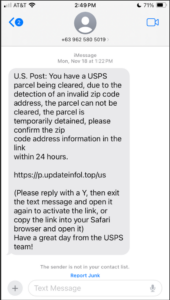
SMS phishing, sometimes known as smishing (because in infosecurity we love a good portmanteau!), are messages received over some form of texting, including platforms like WhatsApp. These can be very elaborate, like the one pictures below, or as simple as a quick sentence. Sometimes they are sent just to you, and sometimes you get put in random group chats the messages are sent to. Much like email phishing attempts, the goal of these are sometimes to get you to click a link that leads to a suspicious website, a form that tries to get information from you, or downloads a virus. Others might just want to see if you answer and then will try to continue the phishing attack. This means that, like any phishing attempt, you should never answer these texts or click links they send!
Social Media Phishing
Really, this is another type of smishing, but it’s unique enough to warrant its own explanation. Have you ever gotten an Instagram DM asking you to be a brand representative because a supposed company “liked your style” even though you have a private account? Or maybe you have a public account, and get tons of comments asking you to DM them to get some prize. Or even you’ve been tagged in a post from a total stranger saying you’ve won a brand new phone or exotic vacation. These are all phishing attempts, and you should never interact with these accounts, whether responding to a DM, comment, or post. Most platforms allow you to report posts you’ve been tagged in as well as block and report accounts. So as nice as it is to think you’ve struck a social media sponsorship just by existing, it’s much more likely they’re phishing, so delete those comments and DMs and report those posts.
Phone Call Phishing (Vishing)
If you’ve ever owned a phone, you know these calls. They claim to be from your internet provider, insurance company, employer, or some random person claiming they’ve gained vital information on you. Called vishing for voice phishing, sometimes it’s easy to tell these are fake; maybe their caller ID is a different name than they introduce themselves as, or they say they are calling from a company you don’t have insurance with. Other times, it can be harder to tell. A good strategy when you get these kinds of calls is always to ask for more information before revealing anything to them, including even your name. Ask where they are calling from, what they are calling about, or for details about the situation. Also keep in mind the same things you would for an email phishing. Were you expecting a call from this company? Is this problem something reasonable? Did you recently take action on whatever they claim to be asking about, like an account or payment? Never give anyone information until you are sure they are a legitimate caller, especially about passwords, credit cards, or any other sensitive information phishers and vishers usually are after!
And many, many more…
There are lots of other kinds of phishing, from spear phishing, which targets a specific person or group rather than being sent indiscriminately, to search engine phishing, where hackers try to get their websites to appear high in search results so you click on them. However, these three along with emails are the most common types of phishing you’re likely to encounter. The main lesson is that phishing can take lots of different forms, some of which look nothing like the ones we talk about on this website. However they all follow the same principles of someone trying to pretend they are someone more reliable to gain access and information. So whenever you encounter something suspicious online, whether an email, text, phone call, social media comment, search result, and anything else, as soon as you think something is off start looking for the common signs of phishing and asking logical questions. With some common sense and knowledge of what phishers are looking for, you can avoid threats online, whatever form they may take.