Today we’re looking at a super interesting phishing attempt. At first glance this email might look completely legitimate, and pretty alarming since it looks like someone has sent nearly $400 from your PayPal, but there are some hints that can clue you in that this isn’t a real threat. Let’s take a look at these hints.
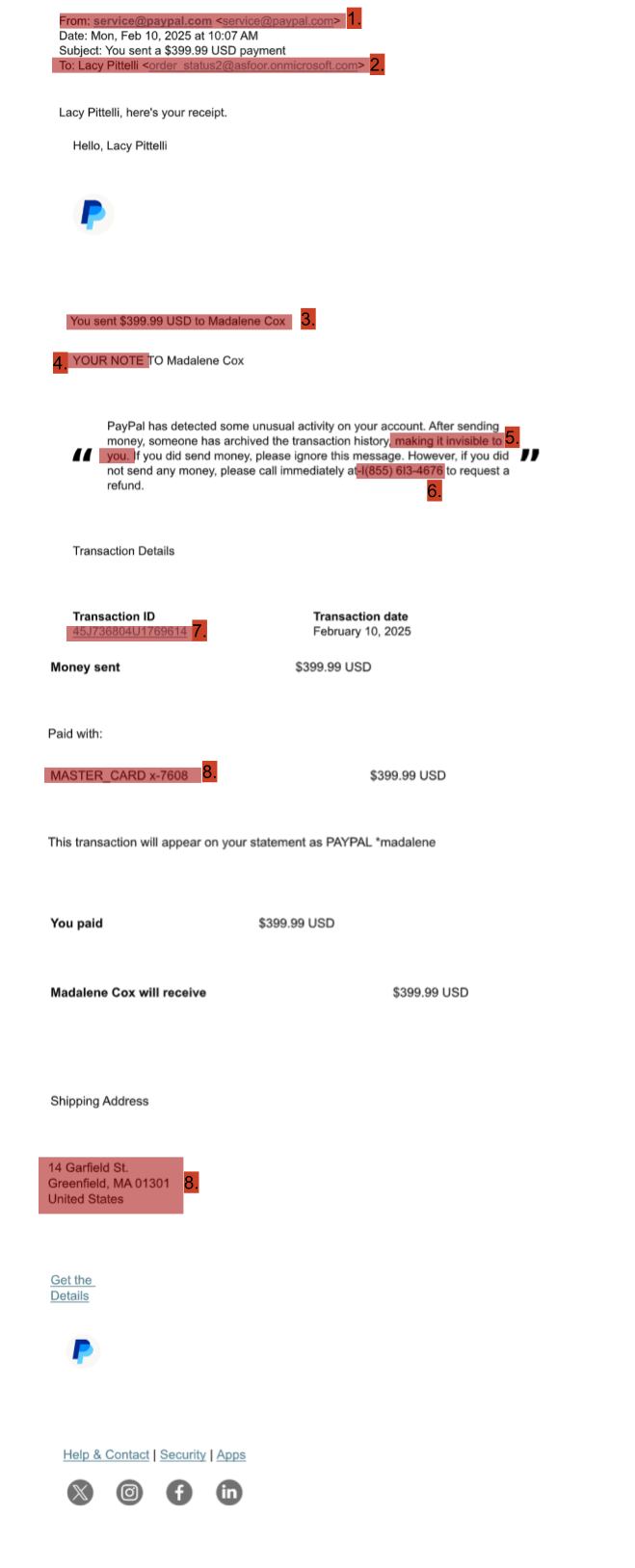
Before we get into red flags, let’s talk about how this phishing attempt works and why it might be hard to recognize as a phishing message. To accomplish this, the people attempting the phishing attempt made a payment to a fake account (Magdalene Cox) to get this legitimate email. They then bcc’d this email to many different people to it appeared to be sent directly from PayPal to the potential phishing victims. It can be hard to see that this is not an official message, so let’s look at some tips it might be.
1. Seemingly official sender – The email address this is coming from at first glance seems legit, and that’s because it is. However, you should always be on alert if this is an email you’re expecting, and if it’s not, go directly to the PayPal website or app (NOT through any links the email sends!) to see if it confirms this information.
2. Recipient name – As mentioned above, this emailed was bcc’d to many people, including the member of the Vassar community who received it. This means that the email was not personalized to the people who received it, and so the name did not match with the person receiving it. If you get an email that is not addressed to you, it’s an instant red flag it’s either spam or something random to ignore and report.
3. + 4. Reason for email– One of the easiest ways to check if a message is phishing is simply to use your logic. Did you recently send this large amount of money? Did you send it to someone that name? If you look on your PayPal account, do you see this transaction there? While it is possible that someone hacked your account and made a payment in your name, these quick checks can at least alert you that something suspicious is going on and help you decide your next move.
5. Suspicious claim – The claim that the transaction has been hidden is very unlikely. Phishing attempts will often make claims that rely on unreasonable claims such as this, hoping that you believe their knowledge of technology is better than your own. However, think for a second. Does it seem likely that PayPal would have a feature that someone else could make your own transaction invisible to you? That would be a pretty useless and invasive feature, so it’s a safe bet that this is not true, and that therefore this transaction simply never existed.
6. Fake phone number – The 1 in this phone number has been replaced with an lowercase “L.” This number has been associated with fraudulent activity, so this is an attempt to avoid people looking up the number and finding this out. But in doing so, this reveals the number to already be suspicious.
7. Link leading to error – If you were to click on this link (which you shouldn’t if you’ve already noticed the above tips and identified it as a phishing message!) it would redirect you to PayPal, but give you an error, likely because the transaction the email is about does not exist on your account. This is another good way to determine this is not a real request.
8. Mismatching card number and address – This address, as well as the card number that was given with it, did not match up with the recipient of the email. Much like the email not being addressed to them, this is a good sign that the email is a phishing attempt.
That was a lot of signs for a seemingly official email! This phishing campaign is a great example of the more subtle ways that cyberattackers try to get information from you, as well as the ways that you can use some simple logic to avoid falling for it.