This new phishing email was just received by someone in the Vassar community. Let’s take a look at some of the red flags.
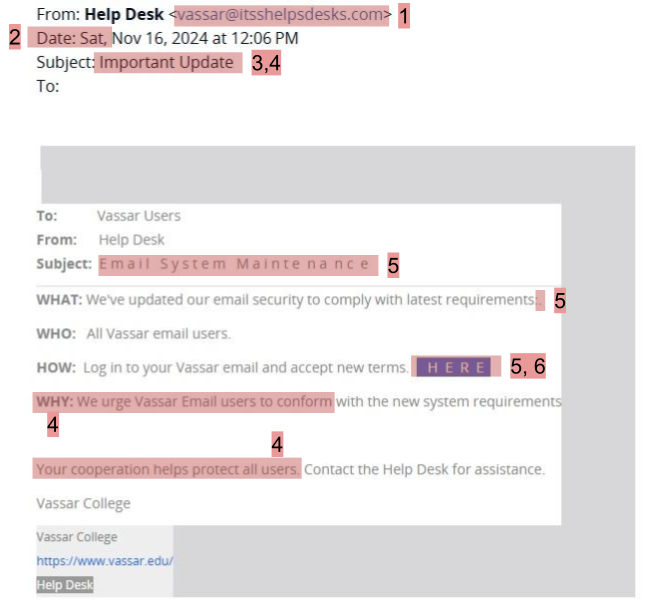
1. Suspicious email domain – All Vassar emails end in @vassar.edu, and an email that ends with something else should immediately cause you to look closer. While some emails, like messages from newspapers you’ve subscribed to or MicroFridge information, will come from different domains, something claiming to be from the Help Desk and be about email security should definitely be from a Vassar email address. Further, there are two typos in the domain @itsshelpsdesks.com. They try to use Vassar in the email address to establish authority, but these other red flags make it clear this is a phishing message from a fake email.
2. Send date – This email was sent midday on a Saturday. While it’s possible you might get messages like this outside of working hours, it should strike you as a bit odd that the Help Desk would be conducting supposedly important work like this on a weekend.
3. Vague subject line – The subject “Important Update” doesn’t give much information, and so it could easily apply to many situations and people, which is a common red flag for phishing emails since they are often sent so widely.
4. Creating a sense of urgency – The subject line as well as the use of the word “urge” and statement that “your cooperation helps protect all users’ are all attempts to establish a sense of urgency. These statements try to make this request seem urgent as well as puts weight on you carrying out the request, which the senders are likely hoping means you will not further examine the message and see it is not real. This is a common strategy in phishing attacks.
5. Typos and strange spacing – In the subject and link there are spaces between every letter, and there is a point where there is a colon with a period directly after. These sorts of typos and strange formatting choices (here the spaces, but at other times strange whitespace, as well as things like spelling and grammar mistakes) are common indicators of phishing. You should always expect proper formatting from emails that claim to be from an official source, and when they are not properly formatted they are likely phishing.
6. Suspicious link – This uses one of the most common phishing strategies: a call to action that requires clicking on a link. This link is very vaguely named (“HERE” does not give any information on where the link may be leading) as they often are in phishing emails. If you hover (don’t click!) over the link, you’ll see that it’s goes somewhere suspicious (see image below). The name of the website appears to be related to something with cars, which has nothing to do with the actual email, and seems to be based in Australia (notice the .au). You should always hover over links and see if they seem unrelated and suspicious like this one if you are not sure that an email is real, and you should NEVER click on a phishing link!