Welcome back from winter break! The semester is fully underway, and that means so are phishing attempts. Let’s take a look at one someone received a few days ago.
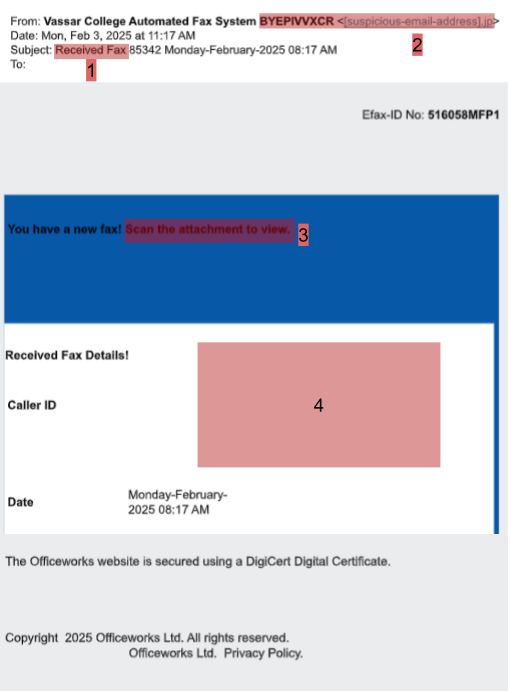
Here are some red flags to spot:
1. Suspicious reason for email – Right from the start, the reason for this email should seem suspicious. Staff will never receive fax over email, and students almost certainly will never receive a fax, period. So seeing this subject line should alert you that something phishy is up.
2. Unexpected sending address – The sending address for this email was from a string of random letters and numbers, which is a common sign that this is a phishing attempt, and not from a real person or even service. Plus, the “.jp” at the end means this email is sending from Japan. The chances you’re getting a fax from Japan without knowing it are pretty low, so this should tip you off that something is off too.
3. QR code asking for signature – This email asked the receiver to scan a QR code, which then asked for them to sign a document. Much like with the fax over email, Vassar will never have you sign a document in this manner. And even if the email is coming from outside Vassar, scanning a QR code to view a document, especially without details on what the document is, is suspicious. You have no way of knowing where the QR code is going, or if it’s downloading a virus to your device. You should never scan a QR code like this, nor should you sign any documents in this manner.
4. Strange formatting – This email has been reformatted to fit in this post, and yet you’ll notice it’s still formatted rather strangely. There’s a lot of whitespace and changing colors that just look off. Much like typos, this is a good red flag to keep an eye out for, as it often means the email is phishing.