This phishing message about a staff report release was just received by someone in the Vassar community. Let’s take a look at some of the red flags in this message to learn ohw to better spot phishing!
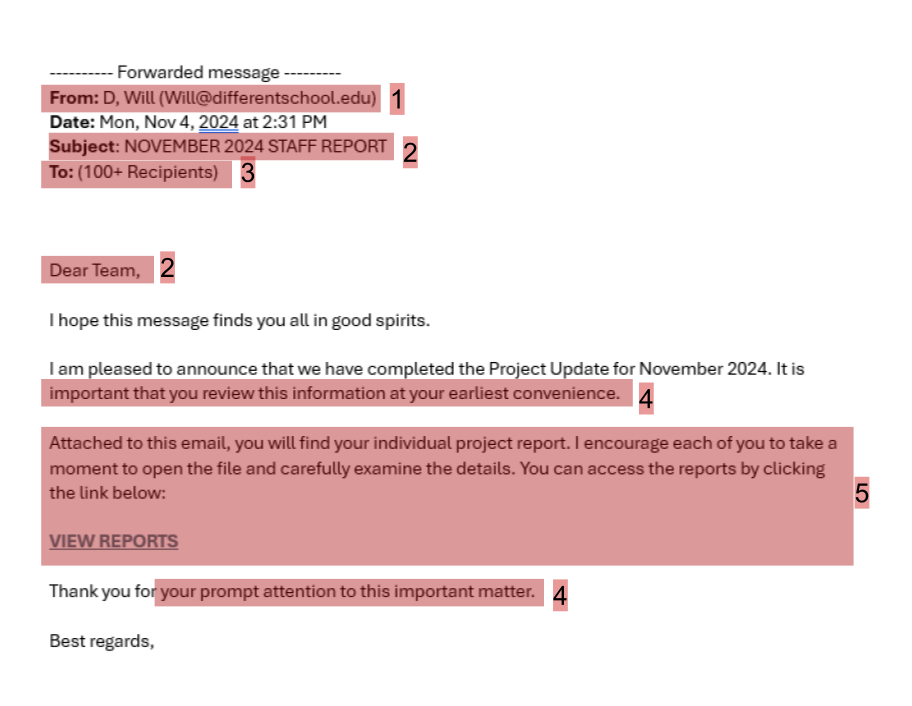
1. Suspicious/unknown sender – While this sender is a real person, they both were emailing from a different school and were not familiar to the receiver. Receiving an email from outside an expected organization and from someone unfamiliar means that this is likely a phishing attempt, as a result of the sender’s account being compromised or email spoofing.
2. Vague subject and greeting – These are a rather vague subject line and greeting, which also suggests that this is not a real email but rather a mass phishing attempt. They are purposefully vague enough to potentially catch the attention of and apply to many people who receive the email. In addition, the subject line is in all caps to try to establish both further authority and urgency.
3. Amount of recipients – Over 100 people were sent this email, which should be an immediate red flag that this is likely phishing. In addition, these recipients were all from different universities, again suggesting a mass phishing attack. This is also another good place where your fact checking can step in; this email is claiming to be for “staff,” so consider how many people, from what schools, and who could be considered staff for your organization (or if you should be receiving a staff email in the first place!) and notice these recipients do not line up at all.
4. Urgency – Twice in this email they ask for reviewing the information sent in a link “at your earliest convenience” and “promptly.” This is attempting to generate urgency so you do not question the email and carry out their call to action.
5. The call to action – Like most phishing emails, this email has a call to action they hope you will execute. This email uses the common strategy of a link they claim goes to important information. The name of the link, while vague, isn’t particularly suspicious, but if you are on a computer, you can hover over any link and see where it leads in the bottom left of your screen. This link led to Jotform, which is commonly used by attackers to create forms that look official or like a login, but are actually stealing your credentials. Remember, while you should never even click on a link from a phishing email, you should absolutely never fill in any forms!