We have two phishing attempts over the winter break. One attempting the reader to click on a link about an “Outgoing Payment” and one attempting to make the reader click a link to a confidential email for a “review request”.
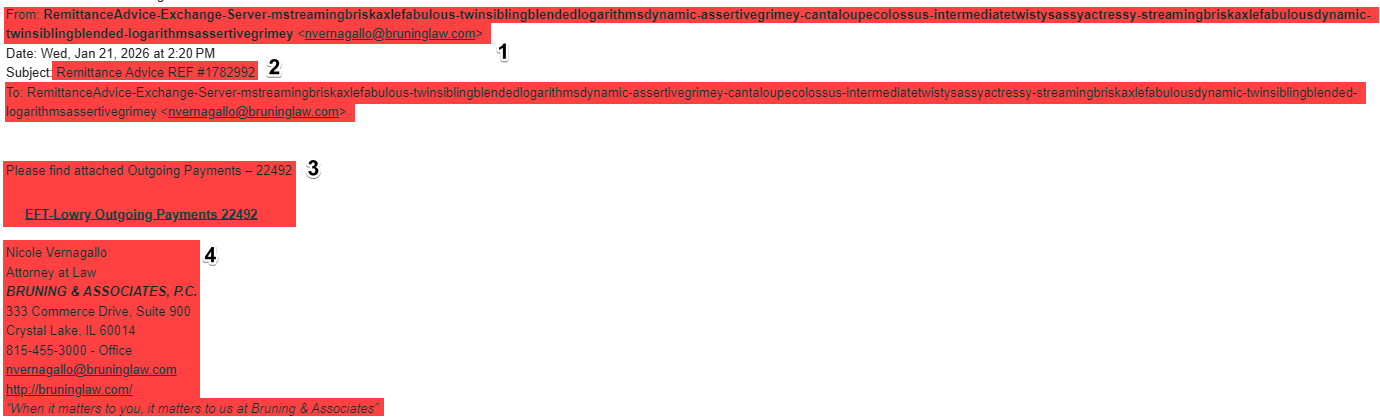
Red Flags in This Attack
- From: and To: Email Impersonation The email that sent this looks like a long string of words that doesn’t have any order to them. However, it has “nvernagallo@bruninglaw.com” impersonating someone by hiding behind these randomized words. Even if the name seems authentic it’s important to realize that you were not expecting this email and the sender is not using a vassar.edu email.
- The Subject “Remittance Advice REF #1782992” is unclear and vague to make the reader want to click on the email and view what was sent.
- The Grab here is where the phisher wants you to go to, with vague wording of an “Outgoing Payments” creating a sense of urgency by making it sound like you are going to have to pay this fee if the reader does not click on this link to find out what it is. This link is probable to contain more attempts to either steal personal information or other malicious actions.
- Further Impersonation here the email is impersonating a law firm and trying to look official. It sets the scene as an official email with a purpose in order to trick the reader to feel safe.
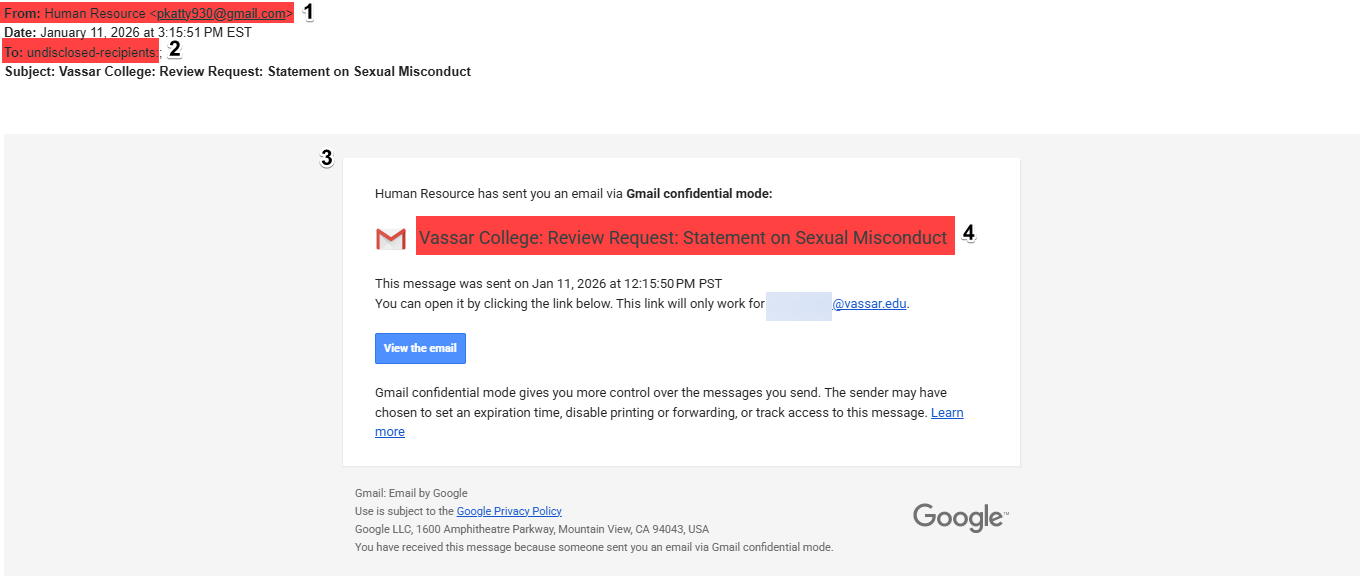
Red Flags in This Attack
- From Source The source of the email appears to be “Human Resource” which would normally be Human Resources but it also shows the real email is “pkatty930@gmail.com” which again as before, is not a vassar.edu email.
- To Source This email has been sent out to an undisclosed amount of recipients leading us to believe it was sent out en masse while trying to hide that fact to appear as it was only sent to you.
- Gmail confidential mode This would not be a normal means for Vassar to send out confidential information to their employees or students, instead we use other forms of communications.
- Sense of Urgency Here the reader sees some problems using two semicolons unnecessarily and a concerning statement that would normally require immediate response. It’s posing as a review request in order to get the reader to click the email and invested further into the phishing trap.
The tip of this post is to remember to always be aware of who the Sender is and who are the Recipients!