Calendar‑based phishing attacks are becoming increasingly common, and attackers are now using Google Calendar invites to lure recipients into scams. Below is a detailed explanation of a recent example observed on campus, along with red flags to look for and instructions on how to report similar incidents.
Example of a Calendar Phishing Attack
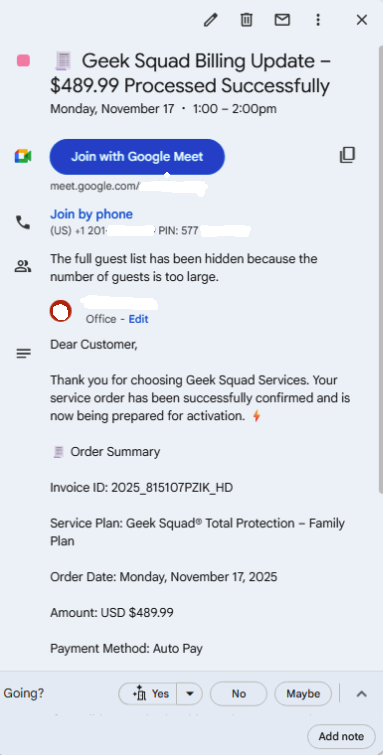
In this phishing attempt, attackers sent a Google Calendar invite titled “Geek Squad Billing Update – $489.99 Processed Successfully”. The goal of this scam is to create a sense of urgency and trick recipients into joining a fraudulent Google Meet session.
Red Flags in This Attack
- The calendar invite was completely unexpected. You should never receive billing or subscription notices via a calendar event.
- The call to action urges you to join a meeting to discuss a fake charge. Scammers use urgency and fear to get you to interact with them.
- Geek Squad / Best Buy will not schedule a Google Meet call for billing disputes. Legitimate companies use official communication channels.
- “The full guest list has been hidden…” This indicates that the sender likely invited a very large number of recipients at once.
- Invoice details, dates, and service plans are all fake. These details are intended to make the scam look official.
How to Report Calendar Phishing
If you receive a suspicious Google Calendar invite, you can report it as spam directly from the event.
- Go to the calendar invite.
- Click the options icon (three vertical dots) in the top‑right corner.
- Select Report as spam.
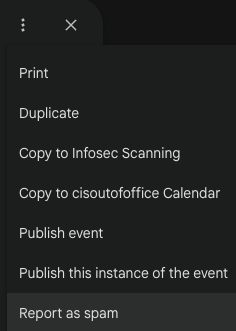
Google will treat the event the same way it treats a spam email, blocking similar messages and helping protect your account.